
During exchange studies
Starting your exchange
Before the start of your exchange studies, you will receive an email from us covering all the important information you need to know before your exchange period begins. Students starting in the autumn semester can expect this message in early August, and those starting in the spring semester around late December.
Your studies will begin with an information-packed Orientation Days which are an integral part of the studies at LUT University. The orientation is mandatory.
Here you can see the program for orientation days:
Orientation Days for Exchange students
All exchange students are expected to participate in the Orientation Days as the purpose of participating is to provide all the important information for students for being able to get a smooth start for their studies.
Orientation materials will be updated on this webpage after the orientation.
Registering for the courses will be done during the Orientation Days while consultation with the exchange coordinator and tutors will be available. The deadline for course registration is usually the Friday before the courses begin.
See from the orientation program when the course registration takes place.
Please also note that you should have a preliminary Learning Agreement signed by all parties before your exchange begins. However, during the orientation week it is common that some courses are already full or that schedules overlap. In these cases, you will need to make changes to your Learning Agreement.
If modifications are required, you must update your Learning Agreement in Mobility‑Online, sign it, and then obtain the signature from your home university. After that, the incoming exchange coordinator at LUT will be able to sign it.
If you have any questions regarding the Learning Agreement or your course choices, you may contact the incoming exchange coordinator at incoming@lut.fi. There is no separate study counsellor for exchange students at LUT.
We will send you a message through LUT Mobility-Online and request your arrival date. After filling it out you will receive an another email telling that your Certificate of Arrival is available.
If your home institution does not accept the Certificate of Arrival provided through LUT Mobility‑Online, you may send their required form to incoming@lut.fi for completion and signature. You can fill in your personal information on your home university’s document and send it to us, and we will complete and sign the remaining parts.
If your home institution specifically requires a paper document with a handwritten (wet) signature, please contact incoming@lut.fi to arrange the time and place for signing.
All exchange students will get their own personal tutor student. The tutor student will be in contact with you before your arrival to Finland, meet you on your arrival in the Travel Centre and show you around LUT and the city. Tutor students will also help and support you during your whole exchange period in Finland.
The tutor students are second year or older degree students at LUT. You can ask the tutors anything, the answer is not always known, but at least they know where to get help. Besides helping you, the tutors will also take care that you enjoy your student life by arranging different kinds of events during the academic year.
Remember though, that the best thing about being in a foreign country is to find things out by your own and to notice that you really are able to survive in new surroundings, although it may not always be easy. This gives you the best memories and experiences.
Please remember to activate your Student Account before starting your studies. You will need access to your account to be able to complete your course enrolments. Please read further instructions on how to activate your account.
If you are not joining LTKY but would still like an access card for the Lahti campus, you can order one using the Lahti access card form.
After submitting the form, you will not receive a separate email confirmation. If the form was submitted successfully, your order has been received.
The processing time is 1–4 weeks. You will receive an email when your card is ready for collection. The card can then be picked up from the LTKY office (room A141) during opening hours.
Please check the LTKY website for up-to-date opening hours.
Practical information about studying at LUT
You will register for your courses during the Orientation Days, when you can also get help from the exchange coordinator and tutors. The deadline for course registration is usually the Friday before the courses begin.
Check the orientation program to see when course registration takes place.
Before enrolling in courses, all students must create a personal study plan in Sisu.
If your study plan for the whole semester is ready, you can enrol in all your courses at the same time. Alternatively, you can enrol in courses for later teaching periods later, as their enrolment deadlines are closer to the start of each period. The enrolment process remains the same throughout your studies.
Exchange students staying for the whole academic year
If you start your exchange in the autumn and stay for the whole academic year, you can enrol in spring semester courses from 1 December onwards. Spring semester enrolments are not automatic, so remember to enrol in your spring courses yourself once enrolment opens.
The timing of enrolment confirmation varies between courses. For some courses, your enrolment will be confirmed or rejected immediately in Sisu. For others, your status will remain “Registration being processed” throughout the enrolment period, and the final result will only be available after the enrolment period has ended.
You can check the end date of the enrolment period in the last row. Sisu may show a prediction before the final result is available, but the prediction is not always reliable.
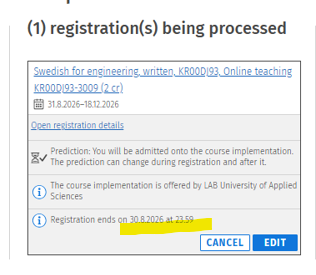
After your enrolment has been processed, Sisu will show whether it has been accepted or rejected. In the example below, the enrolment has been accepted, as indicated under “Registration processed”.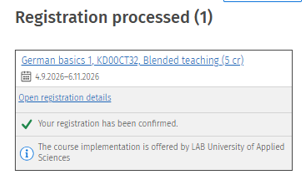
Make sure to enrol in your courses by the enrolment deadline. See the detailed enrolment deadlines for each teaching period here: Enrolments to courses | eLUT
Late enrolment
Please note that if you wish to join a course after the enrolment deadline, you will need permission from the responsible teacher.
How to proceed:
- Request permission from the teacher. Contact the course teacher by email and request permission for late registration. Once you have received the teacher's approval, forward it to incoming@lut.fi
- Make sure the course is included in your primary study plan (PSP). If you cannot add the course yourself, please contact incoming@lut.fi for assistance.
- Pay the late enrolment fee in LUTShop if applicable. The fee does not apply to new students enrolling in first-period courses.
- Email the following documents to opinto@lut.fi
- the teacher's permission for late enrolment. The permission must be recent, no more than a couple of days old, so please proceed promptly once you receive it.
- the receipt for the late enrolment fee, if the fee is required.
- Please wait patiently for your late enrolment to be processed. Processing may take a few days, especially in September.
Late enrolment fee
A fee of 10 euros per course is charged for late enrolment. The fee does not apply to first-period courses when you are starting your studies at LUT University. It also does not apply to language courses.
You can see your timetable from many different systems.
Here are instruction per system:
- Timetables in Sisu
- Timetables in TimeEdit (for LUT Courses)
- Timetables of language courses in LAB's TimeEdit
To find the timetable for a language course, select LAB – Public Timetables → Timetables of courses. Enter the full course code, including the implementation code (the four digits after the hyphen), in the Implementation field and select Show schedule. - Timetables in Tuudo
Please note that some courses are fully online and completed independently at your own pace. Therefore, you may not see any scheduled lectures for these courses.
When enrolling in courses, you may notice that some of your courses overlap.
Here are some tips on what to do if you have overlapping courses:
- If two courses overlap every week, you will usually need to choose which course you want to attend.
- Check whether the courses have attendance requirements and whether attendance is mandatory for all sessions.
- If the courses overlap only a few times during the teaching period, check whether the overlapping sessions are mandatory, such as seminars, or whether occasional absence is allowed.
- Also check whether the overlapping sessions are tutorials or other teaching sessions with multiple groups or time slots. You may be able to choose another group that fits your schedule.
- If you are still unsure, contact the responsible teacher and explain the situation. Ask whether it is possible to miss one or a few sessions because you need to attend another course at the same time.
You must sign up separately for final examinations and mid-terms. Exam dates are available on the exam schedule. Teachers provide instructions for registering for Exam and Moodle examinations.
Registration deadline and fee
Make sure to sign up for exams on time. Registration for an exam closes a week before the exam date and this is the same date when your registration will be confirmed in Sisu.
You can cancel your registration two workdays prior to the exam, see more precise schedule per day here. If you do not cancel your registration, it counts as a taken exam.
After the registration deadline, you may only participate in the exam if there are spaces left. A fee of 40 euros is charged for late registration at LUTShop. The enrolment will be registered automatically after payment.
Cancellation of registration
If you are registered to the exam, but you cannot attend, please remember to remove your registration from sisu, you can do this until 2 workdays before the exam. Removing an registration is important because in other cases it is counted as one attempt out of tree. If you get acutely ill, after the date on removing the registration is over, and you want no to use one of tree attempts, please send the certificate from a nurse/doctor by protected email to opinto@lut.fi. This can be done also after the exam.
Exam location
The examination rooms will be published in the morning of the examination day on the electronic boards in the main entrance and on the wall of Student Services (Indian restaurant) and in eLUT. The list of exam rooms is also found on paper on the board opposite Info-desk.
Read more about exams at LUT here ➞ .
Language courses at LUT are offered by LAB University of Applied Sciences. Therefore, enrolment deadlines and procedures may differ from those for LUT courses. Please follow the instructions provided during the orientation.
Timetables for language courses
Check timetables for language courses here
To find the timetable for a language course, select LAB – Public Timetables → Timetables of courses. Enter the full course code, including the implementation code (the four digits after the hyphen), in the Implementation field and select Show schedule
Student services, benefits and everyday essentials
As an exchange student at LUT you will get a student price meal in our campus restaurants. The price per lunch is 3.10 €. You will receive the KELA meal subsidy card during the orientation, which entitles you to the discounted price.
The Student Union LTKY is a significant part of student culture in Lappeenranta and Lahti, so you can consider becoming a member already before the exchange begins! The membership is voluntary for exchange students, but it is highly recommended. To become a member, you must pay the Student Union fee. Read more on the Student Union website.
If you wish to receive a Finnish student card, you must join the Student Union for LUT University students, LTKY. The membership is not mandatory for exchange students, but comes with several benefits. Please read more here.
Please remember to send the receipt of the student union payment to opinto@lut.fi! Otherwise you will not be able to activate the student card.
We provide individual support for exchange students with special needs. Please contact us at incoming@lut.fi well in advance if you require individual support to get more instructions.
When coming to LUT University as an exchange student, please ensure that you have a documented diagnosis or an expert statement available.
For course-specific individual study arrangements, please contact the responsible teacher as early as possible to discuss and agree on the necessary arrangements. Teachers are responsible for the course learning objectives and any practical matters related to them.
In other words, individual study arrangements are agreed upon between the student and the teacher based on documented expert recommendations (for example, a recommendation from a study psychologist or doctor). The required documentation must be provided by the student.
If you need to use assistive aids or receive assistance in your studies, the necessary arrangements can be made. Please inform the teacher at the beginning of the course.
For information on individual arrangements and additional time for examinations, please read this webpage.
Health care services for exchange students in Finland differ somewhat from those available to degree students. The Finnish Students’ Health Service (FSHS/YTHS) is not accessible to exchange students, so they need to rely on other health care options during their stay.
Students arriving from EU/EEA countries are entitled to receive necessary medical treatment within the public health care system, provided that they hold a valid European Health Insurance Card (EHIC). With this card, they can access public health services under the same conditions as local residents when medical care is needed.
For students coming from outside the EU/EEA, it is strongly recommended to obtain comprehensive private health insurance before arriving in Finland. This insurance should cover the use of health care services, especially in the private sector, as access to public health care without appropriate coverage can be costly. Further information on insurance requirements is available from the Finnish Immigration Service.
In case of an emergency, all students should call 112. For non-urgent situations, additional information and access to public health care services can be obtained through the regional provider.
Moodle
Moodle is the main learning platform used in all courses. You will find course materials, assignments, and exams there, as well as announcements and instructions from teachers.Moodle is the main learning platform used in all courses. You will find course materials, assignments, and exams there, as well as announcements and instructions from teachers.Moodle is the main learning platform used in all courses. You will find course materials, assignments, and exams there, as well as announcements and instructions from teachers.Moodle is the main learning platform used in all courses. You will find course materials, assignments, and exams there, as well as announcements and instructions from teachers.Moodle is the main learning platform used in all courses. You will find course materials, assignments, and exams there, as well as announcements and instructions from teachers.Moodle is the main learning platform used in all courses. You will find course materials, assignments, and exams there, as well as announcements and instructions from teachers.Moodle is the main learning platform used in all courses. You will find course materials, assignments, and exams there, as well as announcements and instructions from teachers.Moodle is the main learning platform used in all courses. You will find course materials, assignments, and exams there, as well as announcements and instructions from teachers.Moodle is the main learning platform used in all courses. You will find course materials, assignments, and exams there, as well as announcements and instructions from teachers.Moodle is the main learning platform used in all courses. You will find course materials, assignments, and exams there, as well as announcements and instructions from teachers.Moodle is the main learning platform used in all courses. You will find course materials, assignments, and exams there, as well as announcements and instructions from teachers.Moodle is the main learning platform used in all courses. You will find course materials, assignments, and exams there, as well as announcements and instructions from teachers.
Moodle is the main learning platform used in all courses. You will find course materials, assignments, and exams there, as well as announcements and instructions from teachers.
Sisu
Sisu is the student information system where you manage your studies. In Sisu, you create your personal study plan (PSP), register for courses and exams, view your timetable, and access your credits, grades, and official study documents.
LUT email (Office 365)
All official communication from LUT is sent to your student email address (firstname.lastname@student.lut.fi). You should check your email regularly and always use it when contacting university staff.
Tuudo
Tuudo is a mobile app that supports your daily student life at LUT. It includes useful features such as course timetables, campus maps, your library card, restaurant menus, and university news – all in one place.
TimeEdit
TimeEdit is the system used for course timetables. You can find your class schedules there. Timetables for the autumn semester are published before the semester starts, and spring timetables are typically released in November.
Exam
EXAM is an electronic examination system, in which the students can take an examination during the time slot the teacher has inserted into the system. The examination is held in separate examination halls, in which there are computers for the examinations and recording surveillance
You can find your timetables in TimeEdit. In TimeEdit you can easily view schedules for courses and timetables for teachers and classrooms. You can also organize your own timetables and export it to your Outlook calendar. Log in to the system using Haka username, ie using your own LUT ID and password.
Changes to timetables are possible so please check the updated timetable from TimeEdit. Timetables are updated almost immediately after the changes are made. Teachers also inform possible timetable changes in Moodle.
Timetables for the autumn semester courses are published in TimeEdit by the beginning of June, and the timetables for the spring semester are published during November.

Finnish Personal Identity Code - requested from all exchange students
Every foreign student needs a Personal Identity Number. It is formed by your birthday and four digits, example 010192-000A. You will receive it from Digital and Population Data Service Agency.
Please find the instructions and timetable for the registration from Student's cheklist item number 19.
Once you have received your PIC from DVV please send the four last characters of the number to it to opinto@lut.fi
The Erasmus Student Network (ESN)
The local section of Erasmus Student Network (ESN) organises a lot of events and trips for exchange students. Read more about the local ESN below.
ESN Lahti is one of the local sections of ESN Finland, and their goal is organise events to ensure that students will have a good time during their exchange! Your semester will be a great opportunity to experience the Finnish culture and meet new people, both exchange and full-time students.
ESN Lappeenranta is part of the Erasmus Student Network. In Lappeenranta, Skinnarila, we assist exchange students from both LUT and LAB University. Our goal is to help you settle in, meet new people, discover the student community, and create a stronger connection between international and local students.
Read ESN Lahti greetings for exchange students.
At the end of exchange studies
At the end of your exchange period, you will be asked to enter your final date of stay in LUT Mobility‑Online. Once you have submitted this information, LUT International Mobility Services will prepare your Certificate of Stay. When the document is ready, you will receive an email telling that your Certificate of Stay is available.
Please note that the Certificate of Stay can only be issued and signed after your exchange has officially ended, so please wait for the email confirmation.
If your home institution does not accept the Certificate of Stay provided through LUT Mobility‑Online, you may send their required form to incoming@lut.fi for completion and signature.
If your home institution specifically requires a paper document with a handwritten (wet) signature, please contact incoming@lut.fi well in advance to arrange the time and place for signing.
The last date for the Confirmation of Stay is usually based on the student’s Teaching and exams end date. This depends on the courses the student has chosen. The “day they return home” applies only if the student still has academic obligations after the last exam or class.
Autumn semester
Most autumn courses finish latest by 22 December.
The “day they return home” applies only if the student still has academic obligations after the last exam or class. If your last academic activity is around 29 December, then that would normally be the official final date of your Erasmus period.
You may report any date up to 31 December, as long as it falls within the official semester.
However, the final date accepted by your home university may vary, as each institution has its own rules for calculating the official duration of the exchange. The end date you report may also affect the amount of your Erasmus grant, so it is a good idea to check your home university’s requirements if you are unsure.
Spring semester
Most spring courses finish by 14 May, but some intensive or summer courses may continue after that. Our estimate for the spring semester is: teaching and exams end between 14–28 May 2027.
The “day they return home” applies only if the student still has academic obligations after the last exam or class. If your last academic activity is around 20 April, then that would normally be the official final date of your Erasmus period.
You may report any date up to 31 May, as long as it falls within the official semester.
However, the final date accepted by your home university may vary, as each institution has its own rules for calculating the official duration of the exchange. The end date you report may also affect the amount of your Erasmus grant, so it is a good idea to check your home university’s requirements if you are unsure.
Once all your courses have been graded and the grades have been entered to Sisu, you will be able to download your transcript of records (TOR) from Sisu. Please note that LUT University will not send your TOR to your home institution, it is your responsibility to do it.
If you encounter any issues with your transcript, please contact opinto@lut.fi
Please note that your LUT account will expire at the end of February for students who attended the autumn semester, and at the end of July for students who attended the spring semester. If you were not able to download your Transcript of Records before your account expired, please contact opinto@lut.fi and request that they send it to you.
Please note that your LUT account will expire at the end of January for students who attended the autumn semester, and at the end of July for students who attended the spring semester.
Before your account expires, make sure to save any coursework or materials you may need later (for example from Moodle or Teams).
Have questions? Contact us
If you can't find an answer from our Incoming Exchange Student Guide, you may contact us. Please note that during our application period and summer time we might have delays with replies. Kindly avoid sending multiple messages to avoid over-crowding the inbox.